Skip to content

Brian Morse

Civil / Survey CAD Professional

Menu
Menu

Adding a Chain Link Fence to Your InfraWorks Model

Posted on 2018-05-172018-05-17 by Brian

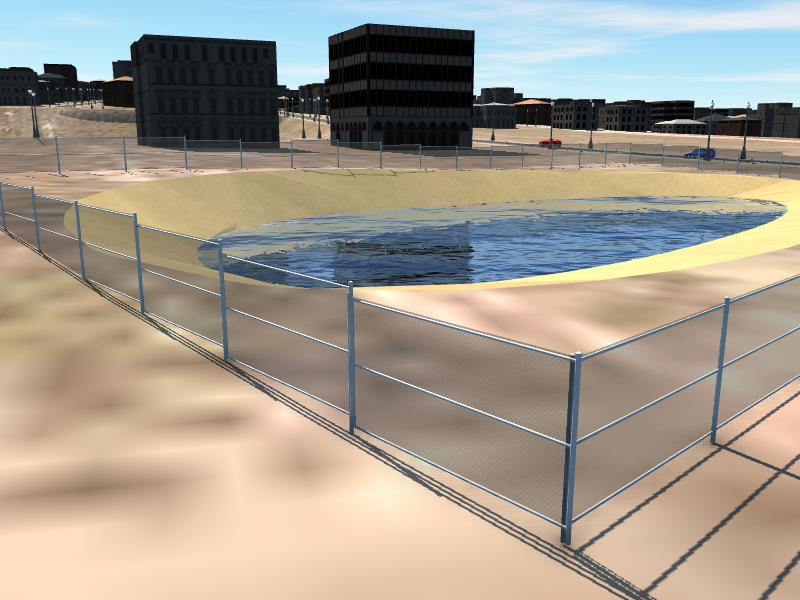
Chain Link Fence in InfraWorks

You want to add a chain link fence to your InfraWorks model but it is not a choice in Barriers nor City Furniture. Don’t worry, it’s easy. Just add a concrete barrier and change the style to Chain Fence Straight found under 3D Model/Bridge Components/ folder.

Chain Link Fence

[envira-gallery id=”1000″]

1 thought on “Adding a Chain Link Fence to Your InfraWorks Model”

  1. Nicolette Szymanski says:
    2018-07-10 at 17:40

    Thank you this is great….

    Reply

Leave a Reply Cancel reply

Your email address will not be published. Required fields are marked *

Categories

MENU

  • Optimize Your Workflow with CAD Expertise
  • Brian’s Professional Skill Set
  • Civil Drafting Services
  • Civil 3D Training
    • Where can I find a good CAD Tech?
    • Effective Learning Methods
    • Training and the infinite return on investment
  • CAD College
  • InfraWorks 360
  • Support
  • Testimonials
    • Gail Oliver, CFM, PLS County Surveyor – St. Johns County, Florida
    • Kevin and Liz Gaines
    • Shirley Zeller – PSM, CPM – Pinellas County Department of Public Works
    • Jimmy Sabbatis – C W Roberts Contracting
    • Chris Miller
    • Todd Ann Carter – SJRWMD
    • Hooshang Shoaei – Polk County
  • Photography
  • Brian’s Scheduling Calendar
  • Family
    • Bob Morse
    • Bunny Morse

Schedule a call

Call Calendar

I was happy with A2 Hosting, not as happy with Hosting.com

billing to early.
© 2026 Brian Morse | Powered by Superbs Personal Blog theme